Custom Search
Showing posts with label Sytem Optimiztion. Show all posts

RegSeeker:Free registry cleaner & tweaking tool

RegSeeker is a perfect companion for your Windows registry ! RegSeeker includes a powerful registry cleaner and can display various information like your startup entries, several histories (even index.dat files), installed applications and much more ! With RegSeeker you can search for any item inside your registry, export/delete the results, open them in the registry. RegSeeker also includes a tweaks panel to optimize your OS ! Now RegSeeker includes a file tool to search for duplicate files, bad shortcuts and more !

Registry celaner

RegSeeker is FREE for personal use only !

You may download it from RegSeeker Official Website

Smart Defrag:Best Free Disk Defragmenter software

The World’s Most Efficient Defragmenter What’s the primary cause of slow/unstable PC performance? It’s disk fragmentation. Smart Defrag helps defragment your hard drives more efficiently than any other product on the market –– free or not. This powerful, award-winning free defragmenter is 100% safe and clean with no adware, spyware, or viruses.

Same Quality and Features as Paid Defragmenter, No Cost Forever. What is the fragmentation status of your hard disk? -- You no longer need to guess... this freeware will give you a complete diagnosis of your current hard drives, then defragment and speed up disk performance in minutes. Tried Windows's default defragmenter and others? -- Now download the most efficient free defragment program with automation!

Comparison Chart with other Free and Paid defragmenter software
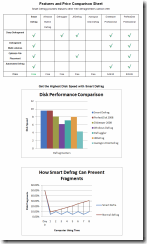
disk defragmenter

Key Features:

  • Extremely Easy to Use

Install it and forget it. This powerful, free defragmenter works continuously, automatically and quietly in the background on your PC. Its intuitive interface makes Smart Defrag the ideal utility for complete computer dummies.

  • Exceptionally Efficient Defragmentation

Smart Defrag has the world’s fastest defragmenting engine. It’s been specially designed for modern, large hard drives, so it eliminates long waiting times.

  • Optimize Disk Performance

Smart Defrag doesn’t just use simple defragmentation. It also streamlines your file system, places the frequently used files and directories into the fastest area of the disk, enabling your computer to run at top speed with the most stability.

  • Always-on to Work Automatically

Smart Defrag works automatically and quietly in the background, so it continually and constantly keeps your computer fragment-free.

  • Data Safe and Reliability Guaranteed

Smart Defrag uses the commercial-level standard to move data and does not damage any file in your disk. Besides, unlike other "Automated" Defragmenters, Smart Defrag does NOT constantly perform analysis and defragment, which does damage your hard drive and shorten its life. Smart Defrag has a "Safe Intelligence" technology that can assure the health of your disk by deciding When and How to start defragmentation.

  • Free Defragmenter Forever

Smart Defrag is 100% freeware. Download, use, and update it absolutely free for your personal computers, business or enterprise servers –– it won’t cost you a penny.

Designed for Windows Vista, XP, 2000. and Windows 7

You may download it From IObit, Official website of Smart Defrag.

Windows Defender:Free Antispware from Microsoft

Windows Defender detects and removes spyware

Windows Defender is a software that helps protect your computer against pop-ups, slow performance, and security threats caused by spyware and other unwanted software by detecting and removing known spyware from your computer. Windows Defender features Real-Time Protection, a monitoring system that recommends actions against spyware when it's detected, minimizes interruptions, and helps you stay productive.

Windows Defender

The benefits of installing Windows Defender include:

Spyware detection and removal

  • Windows Defender quickly and easily finds spyware and other unwanted programs that can slow down your computer, display annoying pop-up ads, change Internet settings, or use your private information without your consent.

  • Windows Defender eliminates detected spyware easily at your direction, and if you inadvertently remove programs that you actually want, it's easy to get them back.

  • Windows Defender allows you to schedule your scanning and removal times when it's convenient for you, whether it's on-demand or on a schedule that you set.

Improved Internet browsing safety

  • Windows Defender helps stop spyware before it infiltrates your computer. Windows Defender also offers a continuous safeguard designed to target all the ways that spyware can infiltrate your computer.

  • Windows Defender works without distracting you. It runs in the background and automatically handles spyware based on preferences that you set. You can use your computer with minimal interruption.

Protection against the latest threats

  • A dedicated team of Microsoft researchers continuously searches the Internet to discover new spyware and develop methods to counteract it.

  • A voluntary, worldwide network of Windows Defender users helps Microsoft determine which suspicious programs to classify as spyware. Participants help discover new threats quickly and notify Microsoft analysts, so that everyone is better protected. Anyone who uses Windows Defender can join this network and help report potential spyware to Microsoft.

  • To help protect your computer from the latest threats, you can choose to have updates that counteract new spyware automatically downloaded to your computer.

Windows Defender is included with all versions of Windows Vista and Windows 7 and is available to download for genuine copies of Windows XP Service Pack 2 or later, or Windows Server 2003 Service Pack 1 or later.

Minimum system requirements for Windows Defender:

  • Personal computer with an Intel Pentium 233-megahertz (MHz) or higher processor; Pentium III recommended.

  • Operating system: Windows Vista, Windows XP Service Pack 2 or later, or Windows Server 2003 Service Pack 1 or later.

  • 64 megabytes (MB) of RAM (minimum); 128 MB RAM (recommended).

  • 20 MB of available hard disk space.

  • Microsoft Internet Explorer 6.0 or later.

  • Internet access with at least a 28.8 Kbps connection.

  • Windows Installer version 3.1 or higher. Visit the Microsoft Download Center to download the installer.

You may download it from Microsoft Windows Defender official download page.

Advanced SystemCare Free

From IObit

The Best System Utility in PC History

With more than 10,000 improvements, Advanced SystemCare Free v3 scans more, repairs more, cleans more, and optimizes more for your computer than ever before.

advanced system care comparison chart

A Click A Day For PC Clean, Repair, Protection & Optimization

Advanced SystemCare Free (formerly Advanced WindowsCare Personal) has a one-click approach to helping protect, repair, clean, and optimize your PC. With over 20,000,000 downloads since 2006, this fantastic, award-winning, free program is a "must-have" tool for your computer, 100% safe and clean with no adware, spyware, or viruses.

Don't waste money on expensive "registry cleaners" to fix your PC when Advanced SystemCare Free will repair, tune, and maintain it for you.

Features:

  • Enjoy That New PC Feeling Again! Designed for the latest Windows system environment. Gives your PC better speed and reliability.
  • Powerful Hard Drive Defragmentation! High-speed Disk Defrag function to defragment hard drives up to 10 times faster than other defragmentation tools.
  • Next-generation Registry Clean and Optimization ! Safely cleans registry junk, compacts registry bloats and defragment the whole registry for maximum performance.
  • Defends PC Security with Extra Protection Improved! Detect and analyze Windows security environment. Scans and removes spyware and adware using up-to-date definition files. Prevents spyware, hackers and hijackers from installing malicious items on your computer. Erases and updates your PC’s activity history.
  • Quick and Extensive Clean-up for Hard Drives Improved! Boosts your system’s performance by cleaning missing files, destroying unwanted files, deleting obsolete files, and removing junk files. Supports clean-up of over 50 different types of junk files.
  • Speeds Up PC Performance and Internet Access Improved! Tunes up Windows by unleashing the built-in power of your system. Dramatically improves both system and Internet performance up to 400%.
  • Fixes Multiple System Errors Improved! Does more than a registry cleaner, keeping your PC stable and running at peak efficiency. Repairs PC configurations by eliminating system bottlenecks and preventing crashes.
  • Extremely Easy to Use Completes its work with just one click. Scans, repairs and gives personal care to your PC in one minute.
  • Safe and Free 100% free with no spyware or adware! Advanced SystemCare Free is a safe and trusted solution from a leading software vendor.

You may download Advanced SystemCare Free from iObit Official Website.

Optimize system speed with Registry Defrag free/Full

Keeping the registry as compact as possible means better computer performance. Auslogics Registry Defrag is fast becoming a useful and essential tool in keeping your registry defragmented. As a result, the Registry becomes compact and small, greatly improving your computer performance.

Auslogics Registry Defrag

Download FREE Auslogics Registry Defrag to defragment and compact the Windows Registry in less than a minute. The program will scan through the registry to remove slack spaces, reducing the registry size and ultimately the amount of RAM the registry takes up, and improving your computer performance.

compatible with Vista/XP/2000/2003, 32-bit and 64-bit and dual-core CPU's.

You may download Auslogics Registry Defrag from Auslogics website.

Speed up your PC with Disk Defrag free utility

Slow startups and shutdowns. Auslogics Disk Defrag is designed for fast optimization of modern hard disks.

Auslogics Disk Defrag

Auslogics Disk Defrag was designed to remedy system sluggishness and crashes caused by disk fragmentation. It is optimized to work with today's modern hard disks. Auslogics Disk Defrag is extremely simple to use, does not require any analysis phase and is faster than most of the other disk defragmentation software. It will help you get the maximum performance out of your expensive hardware investments. And, what’s most important, it's absolutely free.

compatible with Vista/XP/2000/2003, 32-bit and 64-bit and dual-core CPU's

You may Download Auslogics Disk Defrag from official download link.

Defragmentation and Why Defragment your Disks

Defragmentation Explained:

Fragmentation is caused by creating and deleting files and folders, installing new software, and downloading files from the Internet. Computers do not necessarily save an entire file or folder in a single space on a disk; they're saved in the first available space. After a large portion of a disk has been used, most of the subsequent files and folders are saved in pieces across the volume.

When you delete files or folders, the empty spaces left behind are filled in randomly as you store new ones. This is how fragmentation occurs. The more fragmented the volume is, the slower the computer's file input and output performance will be.

Defragmentation is the process of rewriting non-contiguous parts of a file to contiguous sectors on a disk for the purpose of increasing data access and retrieval speeds. Because FAT and NTFS disks can deteriorate and become badly fragmented over time, defragmentation is vital for optimal system performance.

In June 1999 the ABR Corporation of Irvine, California, performed a fragmentation analysis and found that, out of 100 corporate offices that were not using a defragmenter, 50 percent of the respondents had server files with 2,000 to 10,000 fragments. In all cases the results were the same: Servers and workstations experienced a significant degradation in performance.

Why Defragment Disks?

Hard disks are by far the slowest component in your computer. CPU and memory work much faster than hard disks because they do not have moving parts. Therefore fragmented disks often become a bottleneck of the system performance.

Besides causing slowdowns, fragmentation makes the disk drive heads move too much when reading files which leads to freeze-ups and system crashes. It is important to keep your disks defragmented and optimized as much as possible.

Source: Auslogic

Optimize your system speed with Defraggler

Piriform, the company that brought you CCleaner and Recuva... Now bring you a file defragmentation tool... Defraggler!

It differs from other defrag tools on the market, by enabling you to quickly and simply defrag the files you want to, without having to process the whole drive. Simply run it, select the file and defragment in seconds. No more struggling with the Windows defragmentation tool!

Defraggler is completely free for both corporate and individual use.

Features:

Defrag Individual Files: Most defragmentation tools only let you defrag the whole drive. Defraggler gives you the power to select individual files and folders to defrag. So you can get the job done in seconds, rather than waiting for the whole drive to complete. Of course if you want to defrag the whole drive Defraggler will let you do that too.

Compact and Portable: Defraggler was written in the same compact architecture as other Piriform products (CCleaner and Recuva). This results in a compact single EXE application, which can be copied to a thumb drive and then used whenever you need it, without a complex installation process. The EXE itself is less than 1MB!

Vista Support: Defraggler supports all OSs released since Windows 2000, this includes Windows 2000, 2003, XP and Vista. 64-bit support has also just been added! Additionally Defraggler supports both NTFS and FAT32 file systems.

Locate Files on the Drive: After analysis Defraggler lists all the fragmented files on the drive. Selecting one or many will highlight their location on the disk. Allowing you to visually see the location of files on the disk.

Freeware: Why pay hundreds of dollars for a commercial defragmentation tool, when you can use Defraggler for free! This includes corporate use as well!

You may see more screenshots at Defraggler website, and download it from Official Download link.

CCleaner: system optimization and privacy tool

CCleaner (formerly Crap Cleaner) is a freeware system optimization and privacy tool. It removes unused and temporary files from your system - allowing Windows to run faster, more efficiently and giving you more hard disk space.It also have an uninstall manager The best part is that it's fast! (normally taking less than a second to run) and Free.

Cleans the following:

* Internet Explorer Cache, History, Cookies, Index.dat.

* Recycle Bin, Temporary files and Log files.

* Recently opened URLs and files.

* Third-party application temp files and recent file lists (MRUs). Including: Firefox, Opera, Media Player, eMule, Kazaa, Google Toolbar, Netscape, Office XP, Nero, Adobe Acrobat, WinRAR, WinAce, WinZip and more...

* Advanced Registry scanner and cleaner to remove unused and old entries. Including File Extensions, ActiveX Controls, ClassIDs, ProgIDs, Uninstallers, Shared DLLs, Fonts, Help Files, Application Paths, Icons, Invalid Shortcuts and more... Backup for registry clean.

* Windows Startup tool.

Note:

It comes with optional Yahoo Tooblar, if you dont want to install Y! Toolbar then unchek the box named "add CCleaner Yahoo! Toolbar.... in install options

If you like and use this software then it is polite to make a donation to the author.

Download from here http://www.ccleaner.com/download