Custom Search
Showing posts with label Windows Registry. Show all posts

TweakNow WinSecret 2009: Reveal hidden features of Windows 7, Vista, and XP

Reveal hidden secrets of Windows 7, Vista, and XP

As a long time Windows user you might have heard about registry. The registry is a special file in your hard disk that hold most of Windows settings data. Wish to improve your internet speed or display message at Windows logon? No problem, those tasks can easily be done by simply editing the registry value. Unfortunately registry is not a friendly place for most people. Changing a wrong value in the registry may cause an unpredictable problem to your Windows. This is why novice users should not edit registry value directly using a registry editor by them self. In TweakNow WinSecret, it gathered the most popular Windows XP/Vista/7 registry settings and provide them for you in an easy and safe user interface.

Win Secret

All settings are divided in the following sections:

  • Applications
  • Control Panel
  • Desktop
  • Miscellaneous
  • Network & Internet
  • OEM Info
  • Special Folders
  • Start Menu
  • User Accounts
  • Windows Core
  • Windows Explorer

You may download it from TweakNow website.

TweakNow RegCleaner:Registry Scan and fixer tool

Registry scan and repair software.

The Registry is a heart and soul of any Windows system. It contains information that controls how your Windows appears and how it behaves. Most applications today use registry to store configuration and other important data. When you install an application, a new registry entries will be created. These entries will automatically be deleted when you uninstall the application. Unfortunately, it does not always work that way. Sometimes, you will find that some applications fail to remove their own registry entries. These entries will become obsolete.

Registry Cleaner

After a long period, after installing and uninstalling a lot number of applications, your Windows registry will contain a large number of obsolete entries. These will significantly increase the registry size and thus will slowdown your computer, because Windows will need more time to load, search, and read data from registry.

To keep your computer in top performance, it is recommended to periodically clean your Windows registry.

Top Features:

  • Fast: using a high performance engine, TweakNow RegCleaner Pro quickly scan your registry to find obsolete entries.
  • Accurate: using complex algorithm TweakNow RegCleaner Pro accurately identify obsolete entries.
  • Secure: TweakNow RegCleaner Pro automatically create backup file.

You may download it from TweakNow Website.

RegSeeker:Free registry cleaner & tweaking tool

RegSeeker is a perfect companion for your Windows registry ! RegSeeker includes a powerful registry cleaner and can display various information like your startup entries, several histories (even index.dat files), installed applications and much more ! With RegSeeker you can search for any item inside your registry, export/delete the results, open them in the registry. RegSeeker also includes a tweaks panel to optimize your OS ! Now RegSeeker includes a file tool to search for duplicate files, bad shortcuts and more !

Registry celaner

RegSeeker is FREE for personal use only !

You may download it from RegSeeker Official Website

Advanced SystemCare Free

From IObit

The Best System Utility in PC History

With more than 10,000 improvements, Advanced SystemCare Free v3 scans more, repairs more, cleans more, and optimizes more for your computer than ever before.
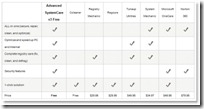
advanced system care comparison chart

A Click A Day For PC Clean, Repair, Protection & Optimization

Advanced SystemCare Free (formerly Advanced WindowsCare Personal) has a one-click approach to helping protect, repair, clean, and optimize your PC. With over 20,000,000 downloads since 2006, this fantastic, award-winning, free program is a "must-have" tool for your computer, 100% safe and clean with no adware, spyware, or viruses.

Don't waste money on expensive "registry cleaners" to fix your PC when Advanced SystemCare Free will repair, tune, and maintain it for you.

Features:

  • Enjoy That New PC Feeling Again! Designed for the latest Windows system environment. Gives your PC better speed and reliability.
  • Powerful Hard Drive Defragmentation! High-speed Disk Defrag function to defragment hard drives up to 10 times faster than other defragmentation tools.
  • Next-generation Registry Clean and Optimization ! Safely cleans registry junk, compacts registry bloats and defragment the whole registry for maximum performance.
  • Defends PC Security with Extra Protection Improved! Detect and analyze Windows security environment. Scans and removes spyware and adware using up-to-date definition files. Prevents spyware, hackers and hijackers from installing malicious items on your computer. Erases and updates your PC’s activity history.
  • Quick and Extensive Clean-up for Hard Drives Improved! Boosts your system’s performance by cleaning missing files, destroying unwanted files, deleting obsolete files, and removing junk files. Supports clean-up of over 50 different types of junk files.
  • Speeds Up PC Performance and Internet Access Improved! Tunes up Windows by unleashing the built-in power of your system. Dramatically improves both system and Internet performance up to 400%.
  • Fixes Multiple System Errors Improved! Does more than a registry cleaner, keeping your PC stable and running at peak efficiency. Repairs PC configurations by eliminating system bottlenecks and preventing crashes.
  • Extremely Easy to Use Completes its work with just one click. Scans, repairs and gives personal care to your PC in one minute.
  • Safe and Free 100% free with no spyware or adware! Advanced SystemCare Free is a safe and trusted solution from a leading software vendor.

You may download Advanced SystemCare Free from iObit Official Website.

What is windows Registry and why to defragment it

What is Windows Registry? The Registry is very much like hard disk drives. Programs on your computer access the Registry thousands of times per second. That means that the Registry, just like disk drives, gets bloated and fragmented with time.

Do You Know the Facts? Most of you already know that a fragmented registry slows down computer speed (same as hard disks). But few are aware that the registry is fully kept in the memory when your PC is running. Memory on your PC is much smaller than disk space and the more bloated the Registry becomes, the less space there is for other programs to run. Knowing that, it should not come as a surprise to you that Windows Vista or XP runs noticeably slower after a few months of work.

Download FREE Auslogics Registry Defrag to defragment and compact the Windows Registry in less than a minute. The program will scan through the registry to remove slack spaces, reducing the registry size and ultimately the amount of RAM the registry takes up, and improving your computer performance.

Source: Auslogic