Custom Search
Showing posts with label Spyware Removal. Show all posts

Super AntiSpyware Free Edition

Super Antispyware has over 12 million users worldwide.It can detect and remove over 1,000,000 threats. It detect and remove Spyware, Adware and Remove Malware, Trojans, Dialers, Worms, Key Loggers, Hijackers, Parasites, Root kits, Rogue Security Products and many other types of threats. It is Light on System Resources and won't slow down your computer like many other anti-spyware products, and it Won't conflict with your existing anti-spyware or anti-virus solution! Super AntiSpyware It can also Repair broken Internet Connections, Desktops, Registry Editing and more with its unique Repair System!

You may download Super Antispyware Free Edition from its official website.

Spyware Terminator:Free Antispyware/Antivirus software

Millions of users worldwide rely on Spyware Terminator, winner of many awards and high ratings from industry experts and users. Its free comprehensive protection is comparable to competitors' paid versions!

Spyware Terminator includes:

  • Fast spyware scanning
  • 100% real-time protection
  • HIPS protection
  • Antivirus protection
  • Multilanguage Support

Spyware Terminator

Key Features:

  • Free Spyware Removel

Spyware Terminator will scan your computer for known threats and report findings in a manner that is easy to read and interpret. Every entry is given a rating and a classification, which makes it very easy to decide if a detected item should be removed. Unlike some free software titles, Spyware Terminator will remove all threats for free.

  • Free Automatic Updates

Spyware Terminator offers the ability to download and install updates automatically. Users are free to dictate how often Spyware Terminator checks for updates and how they are applied.

  • Free Scheduled Scans

Spyware Terminator gives users the ability to schedule spyware scans on a regular basis to ensure computer integrity. Scans can be scheduled on either a daily or a weekly basis at any hour of the day.

  • Free AntiVirus Integration

Spyware Terminator has included the popular award winning open-source antivirus, Clam AntiVirus (ClamAV), for optional integration to achieve a higher level of security. ClamAV can be integrated into spyware scans, updates and the real-time protection.

  • Free Support

Not only is the Spyware Terminator free, but support is included for free as well. Support is provided through e-mail and our public forum. Our highly qualified support team responds to all issues in a timely manner.

  • Free for Personal & Commercial Use

Spyware Terminator is licensed for free for both home and business use.

You may download it from its official website.

What is Spyware,Its Signs and Removing it

What is spyware?

Spyware is a general term used to describe software that performs certain behaviors such as advertising, collecting personal information, or changing the configuration of your computer, generally without appropriately obtaining your consent first.

Spyware is often associated with software that displays advertisements (called adware) or software that tracks personal or sensitive information.

Not all software that provides ads or tracks your online activities is bad. For example, you might sign up for a free music service, but you "pay" for the service by agreeing to receive targeted ads. If you understand the terms and agree to them, you may have decided that it is a fair tradeoff. You might also agree to let the company track your online activities to determine which ads to show you.

Other kinds of spyware make changes to your computer that can be annoying and can cause your computer to slow down or stop responding. These programs can change your web browser's home page or search page, or add additional components to your browser you don't need or want. These programs also make it difficult for you to change your settings back to the way you originally had them.

There are a number of ways spyware or other unwanted software can get on your computer. A common trick is to covertly install the software during the installation of other software you want such as a music or video file sharing program.

The key in all cases is whether or not you (or someone who uses your computer) understand what the software will do and have agreed to install the software on your computer.

Whenever you install something on your computer, make sure you carefully read all disclosures, including the license agreement and privacy statement. Sometimes the inclusion of unwanted software in a given software installation is documented, but it might appear at the end of a license agreement or privacy statement.

Signs of Spyware:

If your computer starts to behave strangely or displays any of the symptoms listed below, you may have spyware or other unwanted software installed on your computer.

  • I see pop-up advertisements all the time

Some unwanted software will bombard you with pop-up ads that aren't related to a particular website you're visiting. These ads are often for adult or other websites you may find objectionable. If you see pop-up ads as soon as you turn on your computer or when you're not even browsing the web, you may have spyware or other unwanted software on your computer.

  • My settings have changed and I can't change them back to the way they were

Some unwanted software has the ability to change your home page or search page settings. This means that the page that opens first when you start your Internet browser or the page that appears when you select "search" may be pages that you do not recognize. Even if you know how to adjust these settings, you may find that they revert back every time you restart your computer.

  • My web browser contains additional components that I don't remember downloading

Spyware and other unwanted software can add additional toolbars to your web browser that you don't want or need. Even if you know how to remove these toolbars, they may return each time you restart your computer.

  • My computer seems sluggish

Spyware and other unwanted software are not necessarily designed to be efficient. The resources these programs use to track your activities and deliver advertisements can slow down your computer and errors in the software can make your computer crash.

If you notice a sudden increase in the number of times a certain program crashes, or if your computer is slower than normal at performing routine tasks, you may have spyware or other unwanted software on your machine.

If you think your computer is infected with spyware, find out how to get rid of spyware and how you can prevent spyware from getting on your computer.

Article is taken from Microsoft Website

Permanent link

Spyware Removal:

To remove you must use some anti-spyware software. Note that only Antivirus itself cannot remove spyware. You must use an Anti-Spyware or an Antivirus that also comes with Spyware protection.

Most popular and Useful but free Anti-Spyware could be found here.

http://fullpcsoft.blogspot.com/search/label/Anti-Spyware

Windows Defender:Free Antispware from Microsoft

Windows Defender detects and removes spyware

Windows Defender is a software that helps protect your computer against pop-ups, slow performance, and security threats caused by spyware and other unwanted software by detecting and removing known spyware from your computer. Windows Defender features Real-Time Protection, a monitoring system that recommends actions against spyware when it's detected, minimizes interruptions, and helps you stay productive.

Windows Defender

The benefits of installing Windows Defender include:

Spyware detection and removal

  • Windows Defender quickly and easily finds spyware and other unwanted programs that can slow down your computer, display annoying pop-up ads, change Internet settings, or use your private information without your consent.

  • Windows Defender eliminates detected spyware easily at your direction, and if you inadvertently remove programs that you actually want, it's easy to get them back.

  • Windows Defender allows you to schedule your scanning and removal times when it's convenient for you, whether it's on-demand or on a schedule that you set.

Improved Internet browsing safety

  • Windows Defender helps stop spyware before it infiltrates your computer. Windows Defender also offers a continuous safeguard designed to target all the ways that spyware can infiltrate your computer.

  • Windows Defender works without distracting you. It runs in the background and automatically handles spyware based on preferences that you set. You can use your computer with minimal interruption.

Protection against the latest threats

  • A dedicated team of Microsoft researchers continuously searches the Internet to discover new spyware and develop methods to counteract it.

  • A voluntary, worldwide network of Windows Defender users helps Microsoft determine which suspicious programs to classify as spyware. Participants help discover new threats quickly and notify Microsoft analysts, so that everyone is better protected. Anyone who uses Windows Defender can join this network and help report potential spyware to Microsoft.

  • To help protect your computer from the latest threats, you can choose to have updates that counteract new spyware automatically downloaded to your computer.

Windows Defender is included with all versions of Windows Vista and Windows 7 and is available to download for genuine copies of Windows XP Service Pack 2 or later, or Windows Server 2003 Service Pack 1 or later.

Minimum system requirements for Windows Defender:

  • Personal computer with an Intel Pentium 233-megahertz (MHz) or higher processor; Pentium III recommended.

  • Operating system: Windows Vista, Windows XP Service Pack 2 or later, or Windows Server 2003 Service Pack 1 or later.

  • 64 megabytes (MB) of RAM (minimum); 128 MB RAM (recommended).

  • 20 MB of available hard disk space.

  • Microsoft Internet Explorer 6.0 or later.

  • Internet access with at least a 28.8 Kbps connection.

  • Windows Installer version 3.1 or higher. Visit the Microsoft Download Center to download the installer.

You may download it from Microsoft Windows Defender official download page.

Advanced SystemCare Free

From IObit

The Best System Utility in PC History

With more than 10,000 improvements, Advanced SystemCare Free v3 scans more, repairs more, cleans more, and optimizes more for your computer than ever before.

advanced system care comparison chart

A Click A Day For PC Clean, Repair, Protection & Optimization

Advanced SystemCare Free (formerly Advanced WindowsCare Personal) has a one-click approach to helping protect, repair, clean, and optimize your PC. With over 20,000,000 downloads since 2006, this fantastic, award-winning, free program is a "must-have" tool for your computer, 100% safe and clean with no adware, spyware, or viruses.

Don't waste money on expensive "registry cleaners" to fix your PC when Advanced SystemCare Free will repair, tune, and maintain it for you.

Features:

  • Enjoy That New PC Feeling Again! Designed for the latest Windows system environment. Gives your PC better speed and reliability.
  • Powerful Hard Drive Defragmentation! High-speed Disk Defrag function to defragment hard drives up to 10 times faster than other defragmentation tools.
  • Next-generation Registry Clean and Optimization ! Safely cleans registry junk, compacts registry bloats and defragment the whole registry for maximum performance.
  • Defends PC Security with Extra Protection Improved! Detect and analyze Windows security environment. Scans and removes spyware and adware using up-to-date definition files. Prevents spyware, hackers and hijackers from installing malicious items on your computer. Erases and updates your PC’s activity history.
  • Quick and Extensive Clean-up for Hard Drives Improved! Boosts your system’s performance by cleaning missing files, destroying unwanted files, deleting obsolete files, and removing junk files. Supports clean-up of over 50 different types of junk files.
  • Speeds Up PC Performance and Internet Access Improved! Tunes up Windows by unleashing the built-in power of your system. Dramatically improves both system and Internet performance up to 400%.
  • Fixes Multiple System Errors Improved! Does more than a registry cleaner, keeping your PC stable and running at peak efficiency. Repairs PC configurations by eliminating system bottlenecks and preventing crashes.
  • Extremely Easy to Use Completes its work with just one click. Scans, repairs and gives personal care to your PC in one minute.
  • Safe and Free 100% free with no spyware or adware! Advanced SystemCare Free is a safe and trusted solution from a leading software vendor.

You may download Advanced SystemCare Free from iObit Official Website.

Ad-Aware Free-Anniversary Edition

The world's most popular anti-spyware!

Real-time protection against spyware, trojans, rootkits, hijackers, keyloggers, and more!

10 years of malware experience combined in one dynamic application. Ad-Aware - Anniversary Edition offers radically improved performance and efficiency, along with comprehensive malware protection. With real-time monitoring, threat alerts, and automatic updates you can rest easy knowing that you are protected.

Ad-Aware Free - Anniversary Edition

  • Shop, bank, and make travel arrangements online That keep you safe from password stealers, keyloggers, spyware, trojans, online fraudsters, identity thieves and other potential cyber criminals.
  • Control your privacy Erase tracks left behind while surfing the Web - on browsers such as Internet Explorer, Opera, and Firefox - in one easy click.
  • Get Peace of Mind Know that your personal information is kept safe from dangerous intruders and prying eyes.

Just set and forget - It'll keep you safe.

Real-time malware protection optimized for home users

Key Features:

  • Detect, Remove AND Clean
  • Ad-Watch Live! Basic: integrated real-time protection
  • Rootkit Removal System
  • Radically improved resource efficiency
  • Lavasoft SmartSet
  • Customizable Profile Scans
  • External Drive Scanning
  • Pin-Point Scanning
  • Full integration with Windows Security Center
  • Easy to download, install & use
  • Detect, Remove AND Clean A step beyond simply detecting and removing malware, Ad-Aware intelligently cleans and restores your system by removing all traces of the infection.
  • Ad-Watch Live! Basic Integrated real-time process protection blocks malicious processes and infected programs that try to start or run on your system, to prevent them from further integration in your system.
  • Rootkit Removal System Advanced anti-rootkit technology protects you from hidden threats and stealth attacks that are designed to gain access to your system by avoiding detection.
  • Radically improved resource efficiency The new version provides ultimate resource efficiency with minimal strain on your system's resources.
  • Lavasoft SmartSet Let the experts at Lavasoft guide you. Lavasoft SmartSet makes scanning and cleaning as easy as possible - by providing automatically configured settings for scans, and by providing recommended actions for found infections.
  • Customizable Profile Scans Easily create personalized scan profiles so that Ad-Aware only scans areas that you select. Save time by scanning areas where known malicious programs are located, or choose from 13 different sections to scan, including critical sections, only executables, ZIP files, and the Windows registry.
  • External Drive Scanning Scan your external storage device, iPod, DVD’s, USB’s, or any other drives that you connect to your PC for an additional layer of security.
  • Pin-Point Scanning Quickly identify whether suspicious files are safe or malicious - right-click any file or folder to perform an immediate Ad-Aware scan or to make a submission to Lavasoft researchers for analysis via ThreatWork.
  • Easy to download, install & use Effortlessly maneuver the complexities of malware detection and removal with our new, user-friendly interface.
  • Automatic Updates Protect against the latest forms of malware with faster, updates to guard your privacy against cyber attacks throughout the license duration.
  • System Restore Point Set a Windows system restore point so you can clean-up your system without fear of obstructing your operating system – revert to a previous state in the event of a problem.
  • TrackSweep Control your privacy by erasing tracks left behind while surfing the web on multiple browsers, including Internet Explorer, Firefox, and Opera, with one easy click.
  • Full integration with Windows Security Center Get Ad-Aware protection and status notifications through the Windows Security Center.
  • Supported Languages English, Dutch, Flemish, French, German, Italian, Portuguese, Spanish, Traditional Chinese, Simplified Chinese, and Japanese.

System Requirements:

Processor : Intel Pentium 600 MHz or better
RAM: minimum 100 MB
Free hard disk space: 100 MB recommended
Operating Systems: Windows Vista (32 and 64-bit), Windows XP (32-bit), Windows 2000 Pro
You may download Ad-Aware Free - Anniversary Edition from Lavasoft website.

AVG Anti-Virus Free Edition

Download AVG Anti-Virus Free Edition - trusted by 80 million users

AVG Antivirus Free Edition is a Basic antivirus and antispyware software. it also have safe searching feature. All for Free.

  • The most downloaded software on CNET's Download.com
  • Quality proven by 80 million users
  • Easy to download, install and use
  • Protection against viruses and spyware
  • Compatible with Windows Vista and Windows XP

Note:

AVG Anti-Virus Free Edition is only available for single computer use for home and non commercial use.

You may Download AVG Anti-Virus Free Edition From AVG Website.

Remove Spywares with Spybot Search n Destroy

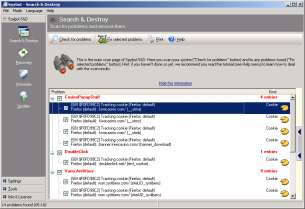
getstarted4-scan.en

Spybot - Search & Destroy detects and removes spyware, a relatively new kind of threat not yet covered by common anti-virus applications. Spyware silently tracks your surfing behaviour to create a marketing profile for you that is transmitted without your knowledge to the compilers and sold to advertising companies. If you see new toolbars in your Internet Explorer that you haven't intentionally installed, if your browser crashes inexplicably, or if your home page has been "hijacked" (or changed without your knowledge), your computer is most probably infected with spyware. Even if you don't see the symptoms, your computer may be infected, because more and more spyware is emerging. Spybot-S&D is free, so there's no harm giving it a try to see if something has invaded your computer.

To see a list of threats Spybot-S&D can remove, visit Threats. For an introduction to Spybot-S&D, please read the tutorial. If you fear incompatibility with other software you are now using, although we can assure you that there is no danger you can review compatibility overview which lists some software whose compatibility has been analyzed.

Spybot-S&D can also clean usage tracks, an interesting function if you share your computer with other users and don't want them to see what you have been working on. And for professional users, Spybot-S&D allows you to fix some registry inconsistencies and extended reports.

Features:

Removal of adware and spyware Removal of dialers Removal of keyloggers Removal of trojans and other baddies Removal of usage tracks

Permanent blocking of threatening ActiveX downloads Permanent blocking of known tracking cookies for IE Permanent blocking of threating downloads in IE

Detailed information about problems found

Strict criteria to define targets

Integrated update function Weekly updates Update notification by mail

Free email & forum support

User-extendable database Save removal of threats by shredding them Backups of every removed problem Exclude option to ignore specific problems Command line parameters to automate tasks Number of targets Number of detection files and entries

You may download Spybot - Search & Destroy 1.6.0 from official download link